
This is for Visual Studio 2019 16.0.0 Preview 1.1
The github associated with this post at:
https://github.com/netazoid/FSharpAzureFunctions
I downloaded VS2019 PREVIEW in little hopes that it would have an included project file for F# Azure functions. Nope, still relegated to second class citizen when using F#. I did some digging and research (a LOT of time wasted that I should not have had to) and I managed to convert an F# Library Project into an Azure Functions project.
After a few attempts, I fire up F5 and boom, compiled functions using F#, dotnetcore2.2 and Visual Studio. To my shock and amazement and also pleasure, the command window scrolls on my local machine the Azure Functions logo and logging lines and boom, http endpoint. Copied the endpoint and boom, it tells me hello! So happy.
So naturally I want to see it on Azure and see if I have the process right. I then wasted a bunch of time for a bit trying to figure out why Azure would not accept it on Publish. I delved in maybe Azure is not allowing the newest dotnetcore, etc. etc. etc. I finally found confirmation that VS2019 16.0.0 Preview 1.1 Function publish is broken and the bug has been fixed for a future VS update. Great that it WILL be fixed, still very frustrating for now.
These are the steps I took. Hope it helps somebody.
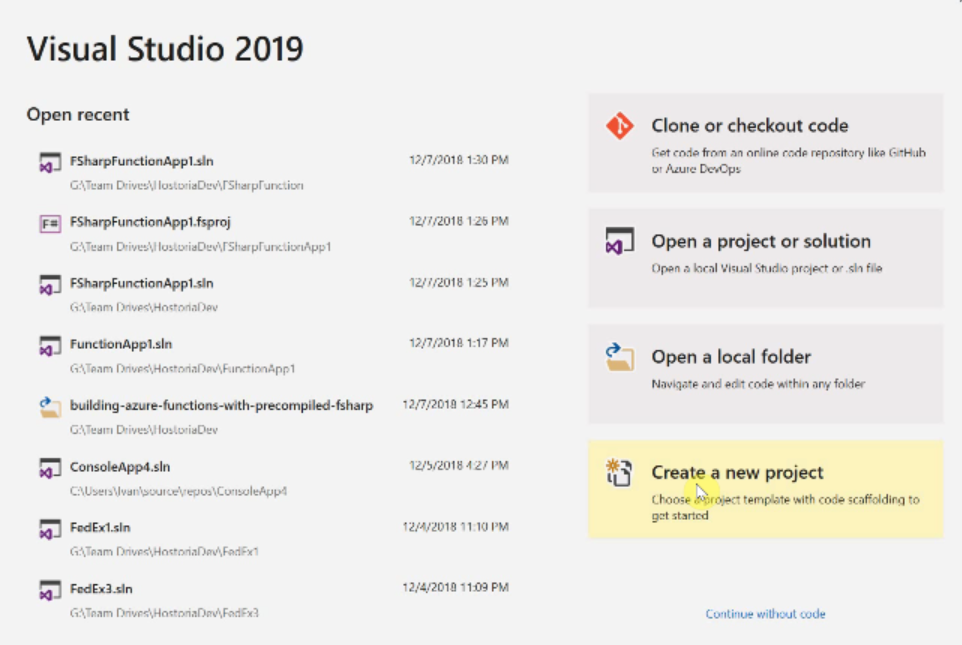
Create a new project (and solution).

Select the F# class library. Name things as you see fit.
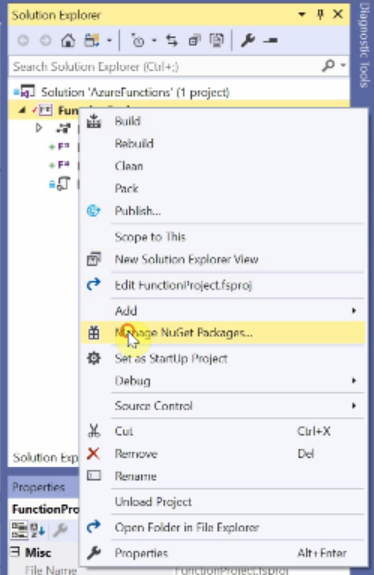
Right click on the project and select “Manage NuGet Packages…“

FSharp.Core and Microsoft.NETCore.App are already there (I updated FSharp.Core to v4.5.4) Select Browse and add “Microsoft.NET.Sdk.Functions”

Right-click the project and do Add > New Item…
Select Text File and name it “local.settings.json“
Add the following json:
{
  "IsEncrypted": false,
  "Values": {
    "AzureWebJobsStorage": "UseDevelopmentStorage=true",
    "FUNCTIONS_WORKER_RUNTIME": "dotnet"
  }
}
Right-Click the project and select EDIT xxx.fsprog file. Add the line
<AzureFunctionsVersion>v2</AzureFunctionsVersion>
So it looks like this:
<Project Sdk="Microsoft.NET.Sdk">

  <PropertyGroup>
    <TargetFramework>netcoreapp2.2</TargetFramework>
    <AzureFunctionsVersion>v2</AzureFunctionsVersion>
  </PropertyGroup>

  <ItemGroup>
    <Compile Include="HelloHttp.fs" />
    <Compile Include="HelloTimer.fs" />
  </ItemGroup>

  <ItemGroup>
    <Content Include="local.settings.json" />
  </ItemGroup>

  <ItemGroup>
    <PackageReference Include="Microsoft.NET.Sdk.Functions" Version="1.0.24" />
  </ItemGroup>

  <ItemGroup>
    <PackageReference Update="FSharp.Core" Version="4.5.4" />
  </ItemGroup>

</Project>
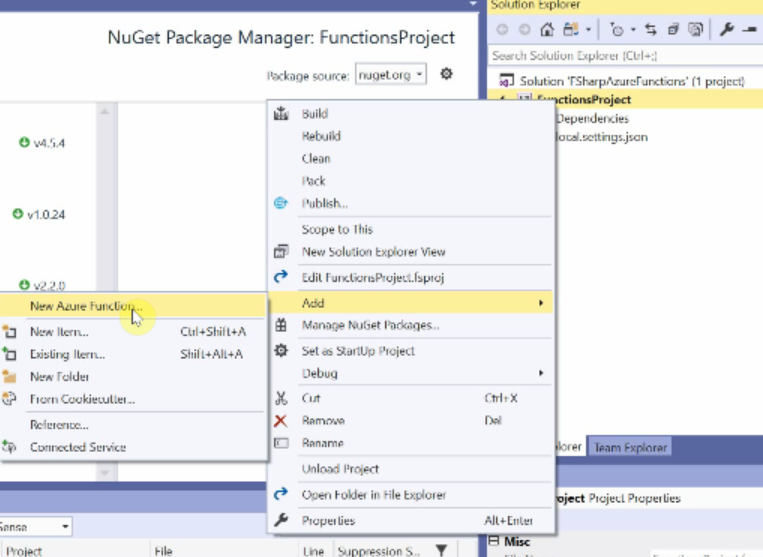
Delete Library.fs file. Right-Click the project. Add > New Azure Function…
Select Source and name the file. Then delete the code there and add the following:
namespace FSharpAzureFunctions

open Microsoft.Azure.WebJobs
open Microsoft.AspNetCore.Http
open Microsoft.AspNetCore.Mvc

module HelloHttp =
    [<FunctionName("HelloHttp")>]
    let run
        ([<HttpTrigger(Extensions.Http.AuthorizationLevel.Anonymous, "get", Route = "hellohttp")>]
        req: HttpRequest) =
            ContentResult(Content = "Hello Http", ContentType = "text/html")

    [<FunctionName("HelloHttp2")>]
    let run2
        ([<HttpTrigger(Extensions.Http.AuthorizationLevel.Anonymous, "get", Route = "hellohttp2")>]
        req: HttpRequest) =
            ContentResult(Content = "Hello Http 2", ContentType = "text/html")
Right-Click the project. Add > New Azure Function…
Select Source and name the file. Then delete the code there are add the following for a timer trigger:
namespace FSharpAzureFunctions

open System
open Microsoft.Azure.WebJobs
open Microsoft.Extensions.Logging

module HelloTimer =

    [<FunctionName("HelloTimer")>]
    let Run ([<TimerTrigger("*/15 * * * * *")>] myTimer: TimerInfo) (log: ILogger) =
        log.LogInformation(sprintf "F# Timer trigger function HelloTimer executed at: %s" (DateTime.Now.ToString()))
Note the [ ] attributes. These tell the build to create your function.json files and such.
You can extrapolate how those work in the functions docs. The FunctionName(“HelloTimer”) will be the name listed under the FunctionApp in Azure.
Build
F5
Yay!
This version of VS will not publish to Azure. They say it is fixed in the next release.
A host.json can be in the root too, but I found it auto-generates when not there.
I used these pages heavily to make this work:
https://spin.atomicobject.com/2018/05/17/azure-functions-f-sharp/
https://discardchanges.com/post/building-azure-functions-with-precompiled-fsharp/
https://mikhail.io/2017/12/precompiled-azure-functions-in-fsharp/
You can check out the github associated with this post at:
https://github.com/netazoid/FSharpAzureFunctions
 TechInfoArchive